On site
Reports and exports
The programme report, Export to P6, workbooks, CSV and chart images.
Everything the app shows can leave it: as a programme report, Excel, CSV, a chart image, a printed page, or a file back to P6.
The programme report#
Export → Programme report (or Ctrl+K "report") opens the Dashboard's figures as A4 or A3 landscape pages, to print or save as PDF.
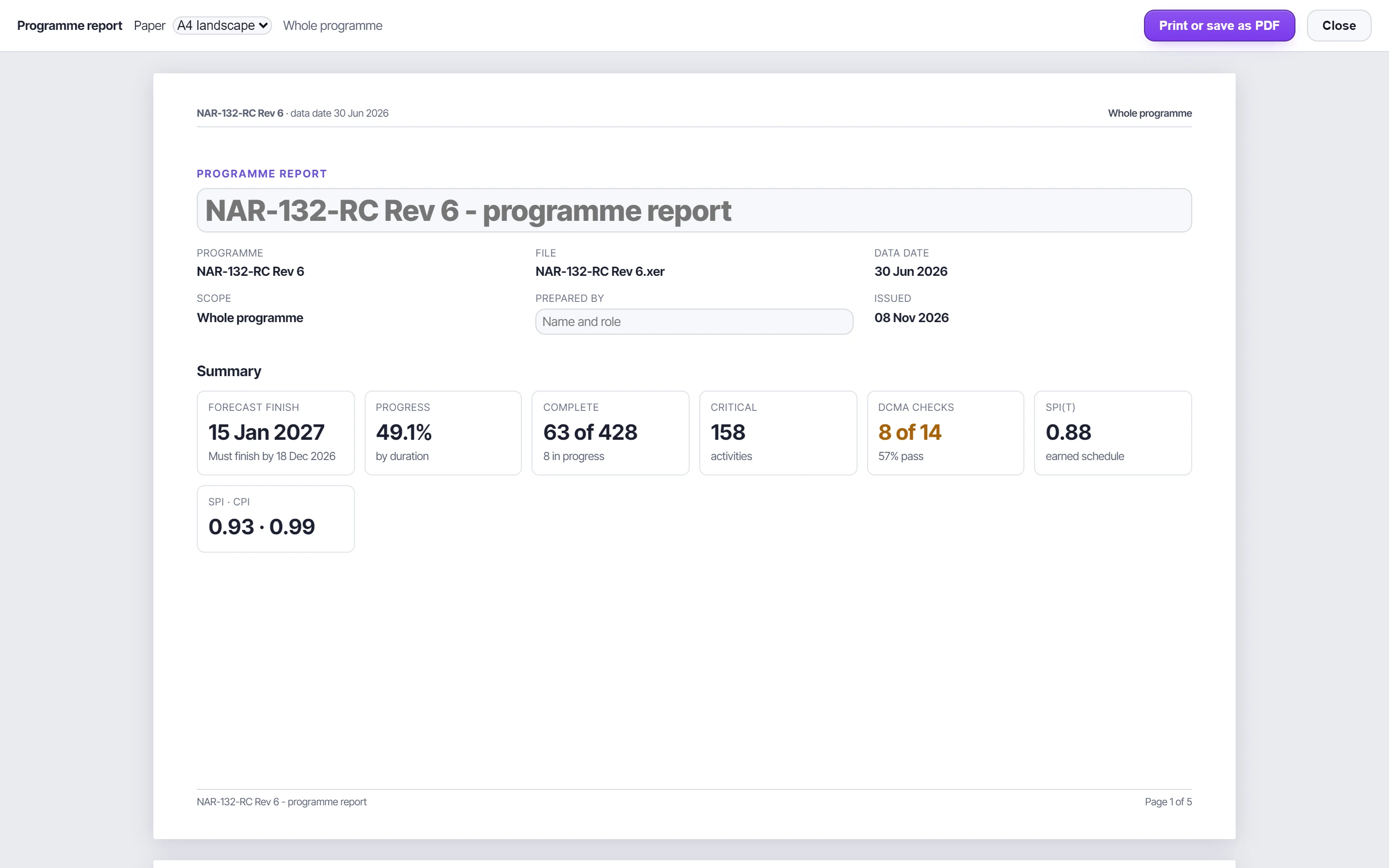
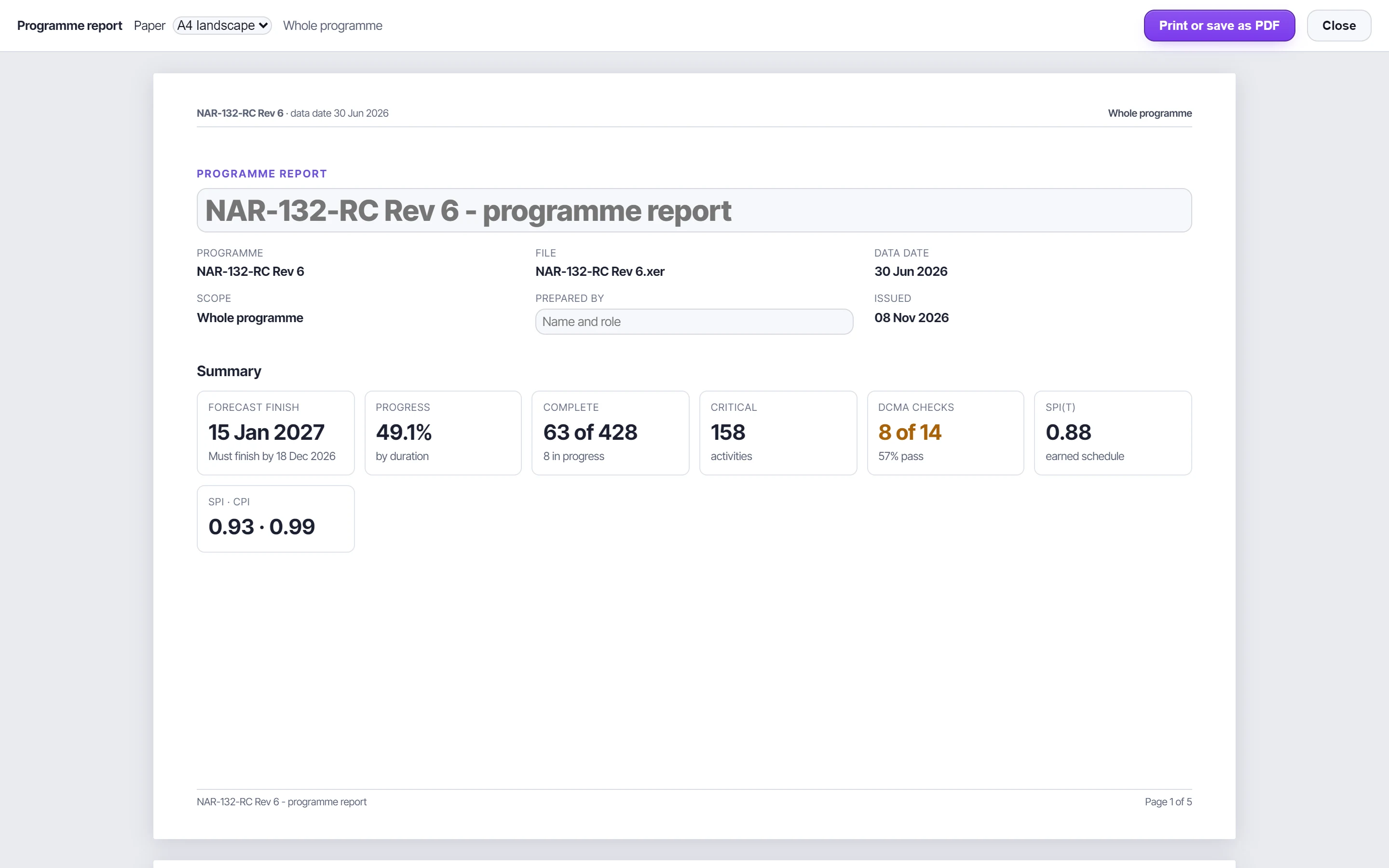
- The pages: the cover with the summary KPIs; the narrative beside the changes since the last update; the DCMA strip and the S-curve; the key milestones and the driving-path timeline; and with NEC4, the time risk allowances, what is due and the early-warning funnel.
- Changes since the last update: the forecast finish (moved in working days), progress, counts, critical activities, the DCMA pass rate and failed checks, and the activities that joined or left the driving path.
- The narrative: write it on the page, or insert a draft built from the figures to start from. It saves with the project.
- Follows the global filter, and names it in every page header.
- Vector and selectable: laid out in millimetres and printed at full scale. A page that runs long is scaled to fit its sheet rather than cut off.
Export to P6#
Export to P6 writes the loaded programme as an XER or a P6 XML file, for the P6 version you choose: 25.12, 24.12, 23.12, 22.12, 21.12, 20.12, 19.12, 18.8, 15.2 or 8.4.
- In the format it was loaded in, the file goes back exactly as it came, every table, field and value kept, with only the version P6 reads changed.
- XER to P6 XML, or back: projects, calendars, the WBS with its earned value techniques, activities, relationships, resources and rates, assignments, expenses and activity codes are carried. User defined fields, notebooks, steps, roles, cost accounts and baselines aren't, and the panel says so.
- A file P6 will import: a file built elsewhere is completed with what P6's import needs, and the panel lists what was added and anything that would still stop the import.
Both directions were imported into P6 25.12 to check them. Other versions change only the version P6 reads, so import those into a copy first.
Excel workbooks#
| Workbook | From | Contains |
|---|---|---|
| Full workbook | Dashboard, Export Excel | A dashboard sheet with KPI cards and native Excel charts, summary, diagnostics, insights and their evidence, health checks and violations, S-curve, float distribution, resources and histograms. Comparison, trend, risk and NEC4 sheets are added when those analyses exist |
| Forensic | Forensic Analysis | The whole forensic report, every row |
| Trend | Trend & Forecast | Summary, updates, periods, milestones, missed finishes |
| Baseline and delay | Baseline & Delay | Variance with a colour scale, milestones, scope added and removed, windows, delay contributors |
| Look-ahead | Look-ahead | WBS groups that fold, bars drawn from the dates, a Waiting-on sheet |
| Progress update | Progress Update | Overview, a sheet per person, team, all updates, guide |
The screen shows the first rows of long lists and says so. The workbooks carry every row.
CSV#
Every DCMA violation list, every insight's evidence, the activity register and the risk register download as CSV. Cells that look like formulas are neutralised, so a CSV can't run anything when it's opened.
Chart images#
Every chart has a button in its corner to save it as a PNG, for reports and slides.
Printed reports and PDF#
Each tab's Print button lays the tab out as a compact report:
- a one-line header naming the tab, the programme and its data date, and page numbers at the foot;
- tables in full, with headings repeated on every page;
- the light theme, without the sidebar, buttons or scroll boxes.
Choose the paper size and orientation in the print dialog. To make a PDF, choose Save as PDF as the printer. The look-ahead keeps its own printed sheet.
A corrected XER#
Repair XER writes a new XER that imports back into P6, after you've reviewed every change.